PivotCut: taking a personal project from code to a public release
The story behind PivotCut, a macOS app for 2D cut-out animation: from technical constraints and architecture to preparing a first public release on itch.io.
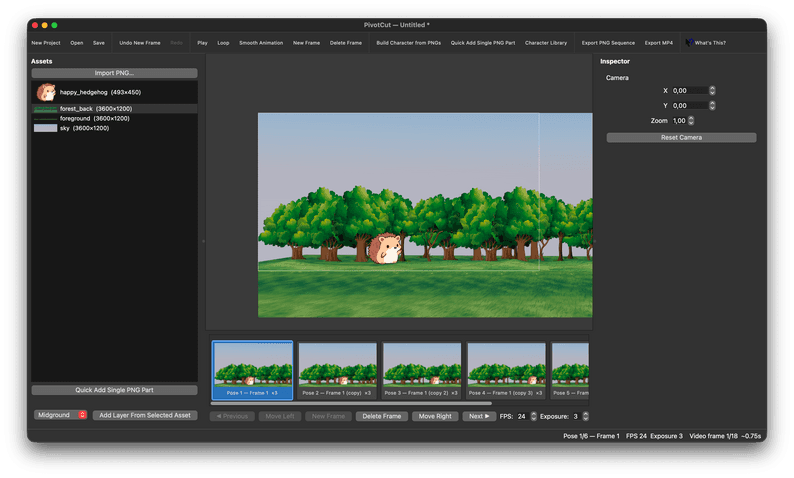
Many personal projects stay in a grey area for months — or forever. They work on their creator's computer, have an organised repository and perhaps a test suite, but they are not yet something another person can download, try and understand.
With PivotCut, I am working on exactly that transition. It is a desktop app for macOS Apple Silicon designed for 2D cut-out animation: characters built from reusable PNG parts, poses organised on a timeline, and scenes composed with layers, camera movement and parallax.
This article is not only about what the project does. It is about the reasoning behind taking a personal app towards a first public release: what to define, what to leave out, which limitations to state openly, and why publishing before a product feels “perfect” can be the most useful choice.
The problem I want to solve
2D cut-out animation starts with a simple idea: instead of redrawing a whole character in every frame, you assemble a character from separate elements — head, torso, arms, legs and details — then change its pose over time.
It is a direct workflow, useful for animated sketches, movement studies, storyboards, short scenes and visual experimentation. To feel good in practice, though, it needs clear tools: importing assets should not create friction, building a hierarchy should remain understandable, and the timeline should immediately communicate motion.
PivotCut starts there: create a focused pose-to-pose environment with a desktop interface and a technical model solid enough not to become fragile as the project grows.
What PivotCut does today
The current version is a native app for macOS Apple Silicon. Its core supports a complete workflow, from scene construction to export.
PNG assets and rigs
You can import transparent PNG files and reuse them across a project. Character parts can be organised into a hierarchical rig: when a segment rotates, its children follow the parent transformation through forward kinematics.
Every part has a pivot, attachment point, position, rotation, scale, drawing order, opacity and visibility. The Character Rig Builder is used to create and edit this structure without modifying the original PNG files.
Timeline and poses
Animation is organised as a sequence of poses. The timeline displays thumbnails rendered from the actual scene, lets you add, duplicate, delete and reorder frames, and supports FPS and exposure settings.
There is no automatic interpolation between poses at this stage: each pose stays visible for the configured number of video frames. That is an intentional MVP limitation, but it also keeps the behaviour simple and predictable.
Layers, camera and parallax
In addition to characters, a scene can contain background, midground and foreground layers. A virtual camera stored per frame controls position and zoom, while more distant layers react with less parallax.
This does not turn PivotCut into a 3D engine. It remains a 2D model with simplified depth. Still, it is enough to add motion and readability to a composition without introducing shaders, perspective or unnecessary infrastructure.
Export
The app can export a PNG sequence and, when FFmpeg is installed, an H.264 MP4 video. PNG sequences preserve transparency; MP4 export uses an opaque background because the selected encoding format does not retain an alpha channel.
Architecture before graphics
A creative project can seem like a natural candidate for the usual approach: make the interface work first, then clean up everything else. For PivotCut, I chose the opposite route: separate the application domain from the GUI early.
The project model — frames, rigs, bones, layers, camera, assets and timeline operations — does not depend on Qt. This makes the logic testable without launching the interface and prevents graphical objects from accidentally becoming the source of truth for the data.
The PySide6 UI translates user interactions into domain operations. The canvas can be rebuilt from the model, the timeline can regenerate its thumbnails, and export can render a scene without relying on the main window.
Why this separation matters
As an editor grows, exceptions arrive quickly: Undo/Redo, saving, loading, exporting, previews, playback, missing assets and cancelled edits. If all of these responsibilities live inside the GUI, each new feature can become a chain of hard-to-predict side effects.
Separating the domain does not remove complexity, but it keeps complexity local. For example, the same transformation mathematics can serve the canvas, the export renderer and automated tests.
Undo/Redo: a small feature that changes everything
In editing software, user trust often depends on a simple gesture: being able to undo a mistake without fear.
PivotCut uses a command system for operations such as creating, deleting, moving and reordering frames; creating rigs and layers; transforming a part; and changing layers or camera settings. The goal is not to record every pixel of movement, but to capture a meaningful action as one history entry.
This detail has important practical consequences:
- dragging a bone creates one undoable action when the mouse is released;
- a structural edit in the Rig Builder is saved as an atomic operation;
- performing a new action after Undo correctly clears the Redo branch;
- changes invalidate only the thumbnails that need refreshing.
Undo/Redo is also a useful architecture test: if it is hard to implement coherently, state mutations are often too scattered.
Building with explicit limits
The hardest part of an independent project is not adding ideas. It is deciding which ideas not to implement yet.
PivotCut has explicit limits: no inverse kinematics, no automatic tweening, no audio, no multi-selection, no shaders, no 3D perspective and no automatic propagation of structural edits across poses.
These limits are not hidden. They are part of the release boundary. Naming them avoids two common mistakes: selling an overly large promise and making the architecture more complex before a real need exists.
The app supports forward kinematics: when an arm rotates, the forearm and hand follow the hierarchy. For an MVP, this is clear, testable and already useful behaviour. An IK solver would require UX decisions, constraints, edge cases and maintenance that deserve a dedicated phase.
From repository to public release
Having code on GitHub is not the same as having a distributable product. Turning PivotCut into something another person can try requires at least three separate layers: build, distribution and communication.
1. Repeatable builds
The macOS build is produced with PyInstaller. The build script validates the environment, checks the arm64 architecture, runs tests and generates the .app bundle. A repeatable build reduces the risk of distributing a result that only happened to work on the development machine.
2. Clear distribution
The first public destination is itch.io. Although it is mostly associated with games, itch.io is also useful for creative tools and independent software: it provides a project page, screenshots, descriptions, comments, downloadable versions and a context that suits experimental projects.
The release is presented accurately as a macOS Apple Silicon app, not as universal software. Being honest about requirements prevents a poor experience for people using Intel Macs or expecting a Windows version.
3. Communicating constraints
The initial build is not signed or notarised yet. That means macOS may require manual approval through right-click and “Open” on the first launch. FFmpeg is optional, but it is required to create MP4 files.
These are technical details, but they are part of the product experience. Explaining them clearly on the download page is much better than leaving users in front of a security warning or an unavailable export option with no context.
What publishing early means
Publishing an early build does not mean pretending the project is finished. It means giving the software a form that can be tested outside its development environment.
An initial release makes concrete questions observable: is setup understandable? Is the terminology clear? Does the Rig Builder feel natural? Do people look for different features than expected? Does export solve a real use case?
Those answers do not come from planning alone. They appear when someone downloads the app, tries to create a scene and explains where they got stuck.
That is why a first public PivotCut release is not the final milestone. It is the moment when the project stops being only a codebase and becomes a product that can receive feedback.
Next steps
The direction is not to add everything at once. The priorities are to make the experience more reliable and easier to try.
- Prepare a more polished macOS distribution with signing, notarisation and dedicated packaging.
- Create sample projects and demo assets to reduce the time needed to get a first visible result.
- Gather feedback on rigging, timeline and export workflows.
- Evaluate future features through real use, not only through a wish list.
- Keep improving documentation, onboarding and error messages, because they are integral parts of the product.
The principle remains simple: build tools that work today and can still be maintained tomorrow. For an independent project, technical sustainability and a clear scope are not secondary details — they are what makes continued improvement possible.